Server
Database Overhaul
For some big news, the server now supports MySQL and PostgreSQL as database providers! SQLite support is still available as well for anyone that wants to keep their setup simple.
In order to support multiple database providers, the data layer of the application has been rebuilt from the ground up. Due to the way that Blazor SSR handles database contexts, this was a necessary and arduous process and was the source of the most time put into this release. That being said, lazy loading in Entity Framework has been removed. This means that almost every query across the application has been optimized and will run faster while consuming fewer resources.
Support for MySQL and PostgreSQL should be considered experimental. Make sure to keep regular backups as there is a non-zero chance of data loss.
Caching
Many areas of the application now utilize a cache where speed is paramount. Most of these improvements will be seen in the API and loading data from the server in the launcher. Redis support is also being looked at for taking one more step to allowing distributed server configurations.
Authentication
OAuth/OIDC identity providers can now be defined in Settings. No restrictions are imposed, and an "Account Link" functionality has been added to the web UI for existing users. Yes, you read that right, there's no SSO tax!
Some provider templates have been provided, but have not been fully vetted. Keep in mind that most IDPs require SSL for authentication. We'll talk about that a little later, but it's still recommend to use a reverse proxy or products like Cloudflare Zero Trust to provide a robust and secure solution.
New Login / Registration Design
The login and registration pages have been redesigned to be a bit more attractive while supporting new authentication features. A new button for downloading the launcher has been added as well!
These downloads can be provided directly via the server if Host Client Updates is set under Settings / Launcher. Your supported architectures and platforms can be customized as well.
Support for launchers on Linux and macOS are still experimental
Logging
The available logging providers are now able to be fully configured from Settings / Logging. Support for remote logging with Seq or Elastic search has been added. For now this only is supported on the server, but in the future this information may be broadcasted to clients using the launcher in order to collect user logs if desired.
Redistributable Scripting
Additional script types of Name Change, Before Start, and After Stop are now available to redistributables. These script types work the same as if they were defined for games, but they are shared with any game that has the redistributable as a dependency.
Redistributable archives will now be extracted to the game's .lancommander directory under its own directory matching its ID (e.g. .lancommander\d3355f4a-870e-4964-a5a3-832a8d8a6b3f\Files). These files are then cleaned up once install has completed.
Game Custom Fields
Custom fields have been added to games and can be used in scripts (game and redistributable), actions (games and servers), and save paths. These are loaded like any other variable with their name set as-is. For example, if you wanted to have a game custom field of AppId, you could use it in a script as $AppId or in an action/save path as {AppId}.
Server Process Tracking
Some game servers would fail to have their process tracked correctly. This has been revamped and the server's entire process tree will now be tracked. This should resolve any issue previously seen where a server could be started from LANCommander, and then would immediately stop while still actually running on the host machine.
Datatables
Most datatables throughout the web UI have been reworked and should be faster, while supporting column customization. This is an area that will be continued to be improved upon with the potential for individual column searching and filtering being a possiblity in the future.
Image Optimization
Images for media are now optimized on application start and upload. This results in faster downloads for the launcher. The following optimizations are currently implemented:
- PNGs with no alpha pixels are converted to JPG
- "Thumbnails" are generated with a JPG quality of 75
- "Thumbnails" are generated with a max width/height based on type. Refer to Thumbnail Generation for more information.
Multiple Upload Locations
An often-requested feature has been to allow for the uploading of archives to multiple locations on the host. This has now been implemented and is available for configuration in the First Time Setup or Settings / Archives.
Please note that in order to keep track of archives properly, a random GUID is still used as the uploaded archive's name. It is not recommended to alter these files once they've been uploaded.
HTTPS Support
SSL support for Kestrel (the underlying HTTP server) can now be defined in Settings / General. Most OAuth/OIDC providers will require HTTPS for redirects.
Stylesheets
The CSS for the web UI can now be customized under Settings / Appearance. A separate stylesheet only for Pages can also be defined.
PowerShell Scripting
The following cmdlets have been added to the scripting engine:
Get-HorizontalFovGet-VerticalFovOut-PlayerAvatar
Review the Cmdlets documentation for more information and usage.
Fixes and Minor Improvements
- Updated to .NET 9
- Text alignment in select inputs has been fixed
- Uploading large files with the chunk uploader should now be more reliable
- Archive file sizes will now calculate properly on upload
- Searched images can now be double clicked to select
- Login / registration pages have been reworked to support authentication providers
- Documentation and social icons have been added to the main menu
- Cookie policy can now be customized in Settings
- Fatal errors in the UI should now be caught without having to reload the page
- Scripts for installing the application as a service have been provided
Breaking Changes
- In supporting multiple upload paths, configuration has moved from
Settings.ymlto the database. Your current path should have migrated on update, but you should probably double check it. - Redistributable scripts will now execute out of the game's
.lancommander\<Redistributable ID>\Filesdirectory
Launcher
Depot and User Library
On start of the launcher, you'll probably notice that you have no games listed. Fear not! Your games are not gone, your library is just empty. By clicking on the "Depot" button you'll be able to browse and filter the games from the server. From here games can be installed directly or added to your library.
User libraries are tracked by the server and synced locally to the launcher. This also means that logging into the launcher on another machine will sync your user library. For admins, games in the depot will also be filtered based on accessible collections and role permissions so you can curate as much or as little as needed.
Addon Installation
When installing a game that has expansions and/or mods defined, a new dialog will display allowing you to select what to install:
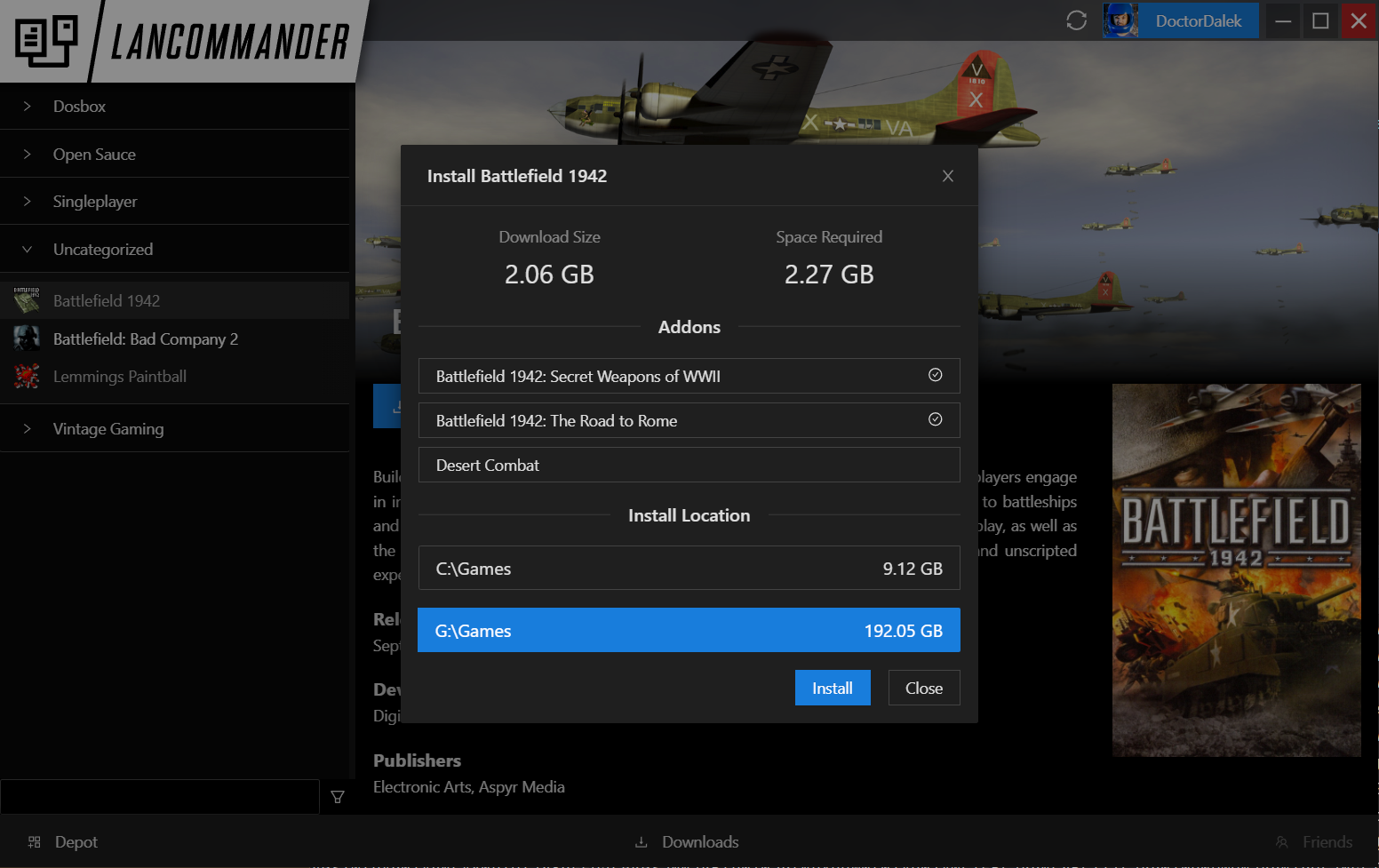 Keep in mind that this does not apply to standalone expansions or standalone mods. For a refresher on game types, check out Server / Games.
This dialog will show expected download and install sizes in addition to selectable install directories (if configured). Did you forget to select an addon when first installing? No worries! Under the game's context menu use the "Modify" option to display this dialog again. You can even move the game to another defined location if so desired.
File Validation
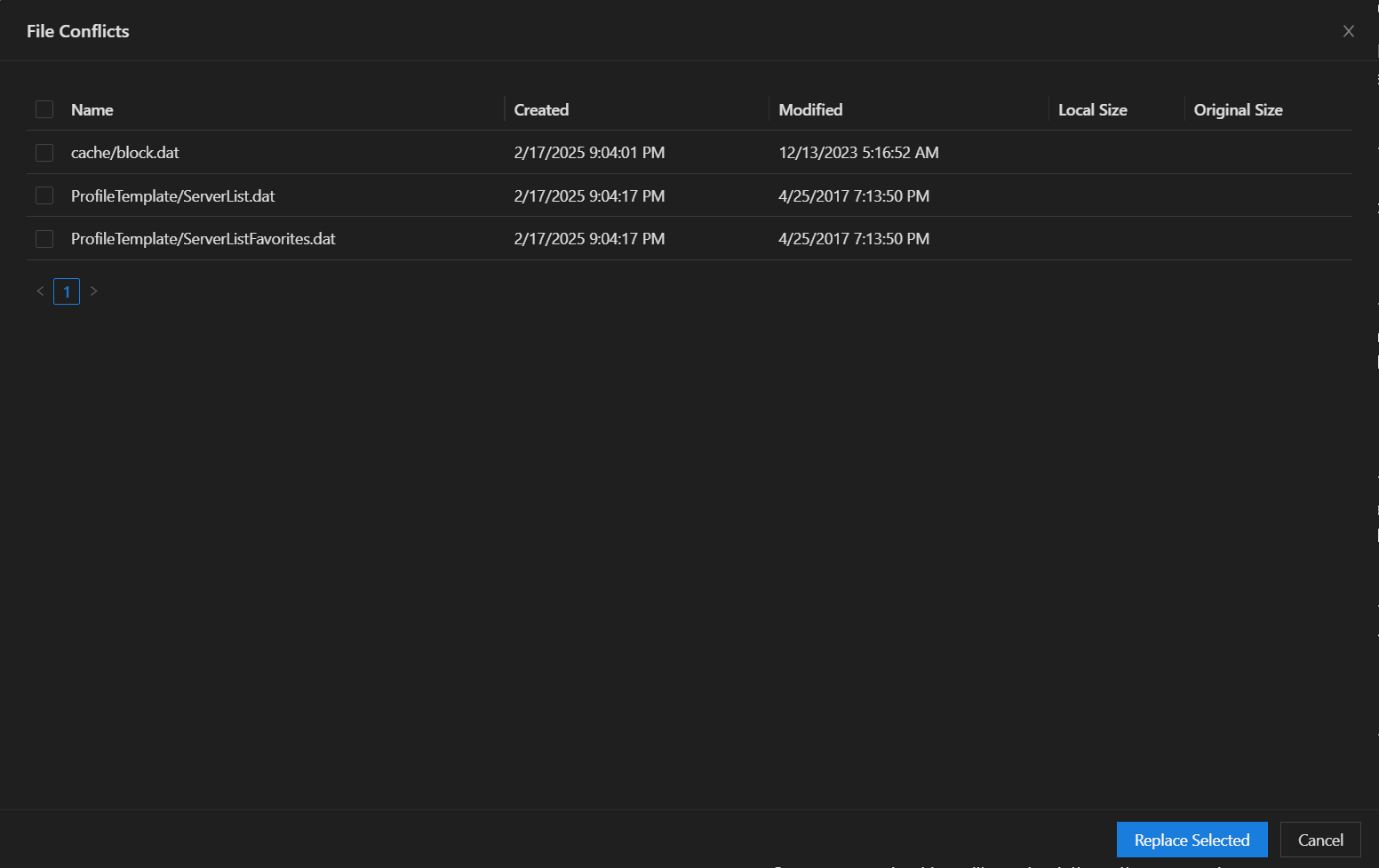
A new tool for validating files has been added to the game context menu. This will compare the game files on your local install to contents of the game's archive on the server. Individual files can be selected for restore. File validation on install has now been improved to increase download speed in the case valid existing files are found on disk. This is fairly basic at the moment, but should hopefully help to fix some broken game installs.
Authentication / Offline Mode
The main authentication form has been redesigned to allow for OAuth/OIDC authentication providers defined by the server. As is customary with these sorts of implementations, you will first have to put in your server address (or select from beaconing servers) and then you will be presented with all login options.
Offline mode has been revamped and should work more consistently. The launcher will actively monitor its connection to the server and automatically turn on offline mode if the connection is lost.
Importing
Speed improvements and optimizations have been made to importing to drastically reduce the time to do a full import. Hovering over the import icon will also display an import status progress popup. Individual game information is cached server-side, so subsequent imports by other users should be faster.
Save Management
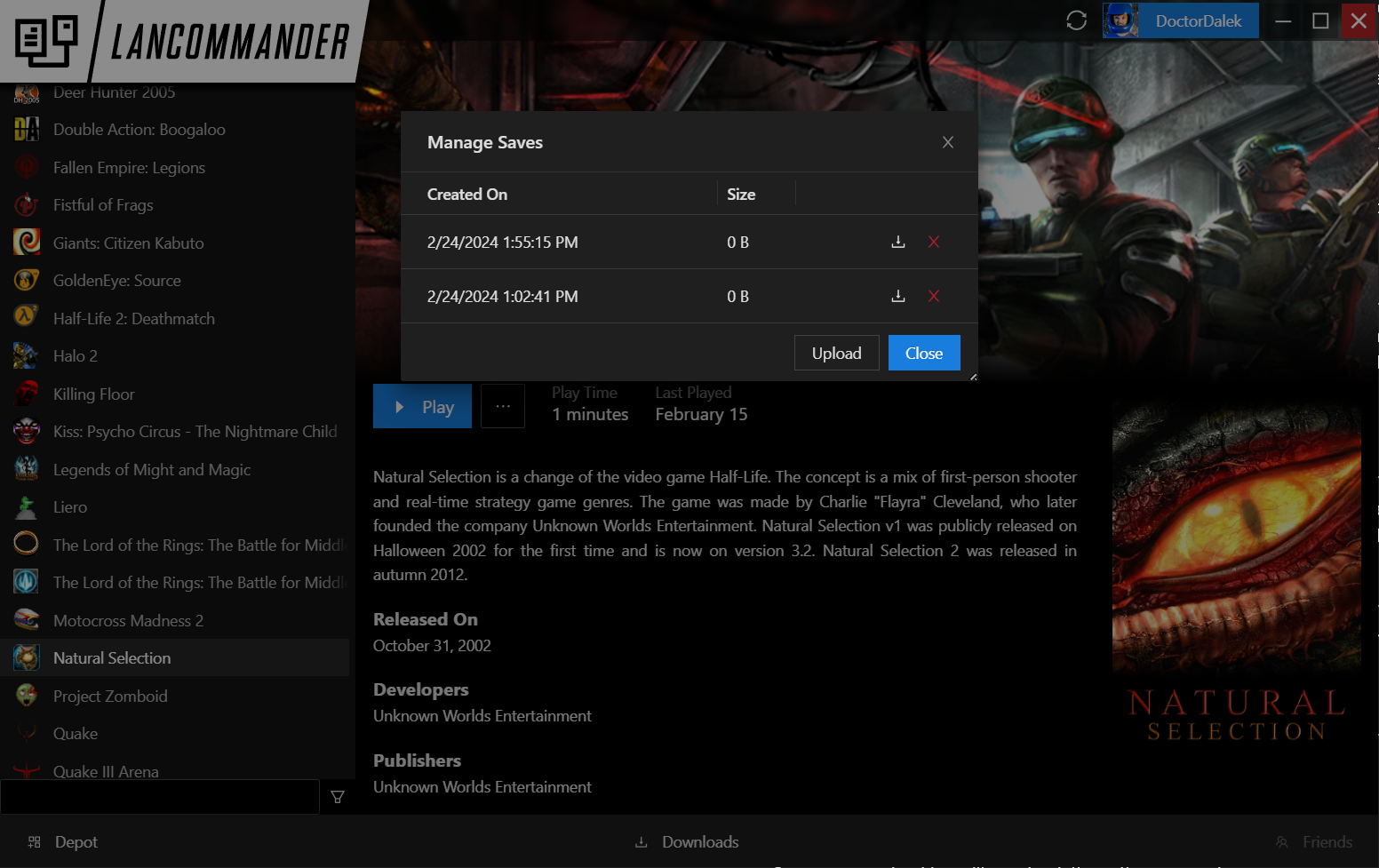
A new dialog for save management is now accessible under the game's context menu. This can be used to download or delete specific saves from the server, or upload the current machine's save files to the server.
Fixes and Minor Improvements
- Updated to .NET 9
- Redistributable installs will now show download progress
- Linux/macOS builds should now load assets correctly (non-Windows builds are still experimental)
- Game process tracking will now track the entire process tree
- Play Session recording has been fixed
- Download / install size is now displayed in the game's status bar
- Filtering, sorting, and grouping should be more reliable
- Progress will now be shown for in-progress installs of mods and expansions
- Game status should now be reflected properly in the main action button
- Server-defined actions should now display properly
- Total play session status displayed per game will now only show the authenticated user's total
- Loading game info on library list click should now be much faster
- Library image assets should now download from server's optimized image files, reducing download time and overall size
- A search field has been added to the library list and filter
- Library items can now be sorted
- Errors when searching for lobbies will now gracefully fail
- Fatal errors will no longer completely hang the UI
Infrastructure
Nightlies
Nightly builds are now available over at GitHub. Docker images are also available via GitHub Packages.
Docker Multi-Architecture Support
The Docker images pushed to Docker Hub now support Linux/ARM64! That's it!
WinGet
An effort is being made to make the server and launcher available as WinGet packages with the names LANCommander.Server and LANCommander.Launcher. These packages are generated on the fly as part of the CI/CD pipeline, so the latest version should always be available.
On Deck
There's a few large features being worked on / designed that will possibly make it into future builds as we kick off 2025:
- Docker support for game servers
- Game server config templates / structured forms (human-friendly UI for server configs!)
- VPN integrations
- P2P / distributed file transfers
- Script templates
- Friend list / chat
- Game overlay
- Rebuilt autoupdater
Community
Lastly, I'd like to shout out the community. This was LANCommander's biggest year of growth in users and features. We saw the introduction of a new launcher, the deprecation of the Playnite extension, and tons of features added along the way. Many of these came as suggestions from our community, and seeing all of your LAN parties has really shown that there's something to this little project.
There's one part of the community I'd like to give a shoutout to. A group of Aussies have banded together to establish a support network for men called DadLAN. They've been able to grow substantially over the past couple of years and have been making headlines down under. I really feel like they represent what LAN parties are all about and why they're so important to gaming culture. For more information, check out their site over at https://dadlan.au/!
I'd also like to take this moment to shill a bit and ask for any contribution you can spare. Whether it's contributing on GitHub, helping out in the Discord, or, if you're able, subscribing to one of the paid Patreon tiers. Any amount of effort goes a long way towards bringing you this excellent piece of software!
Until next time, keep on being Bawlers!